Showing posts with label Newfhugger Photo. Show all posts

Thursday, September 29, 2011

Use of a Subject and Background

One of the very common mistakes made by beginning photographers when photographing a person (or dog) and a background is to put the subject so far back in the image that the photo has to include a caption - "Cousin Meg at the Grand Canyon." Then, viewers have to pull out a magnifying glass to see cousin Meg.
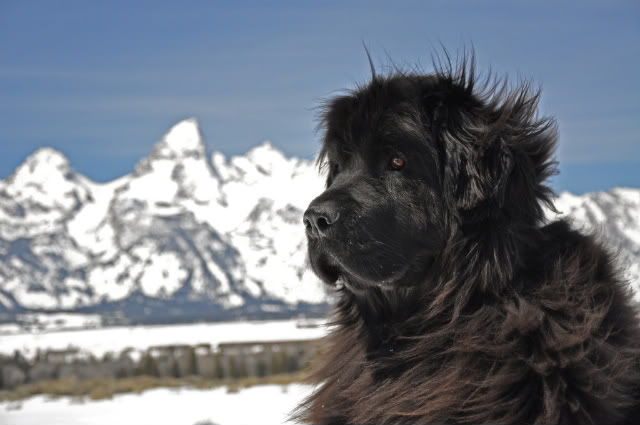
Jeff Schuller took his Newfoundland, Sophie, out for a photo shoot with the goal of incorporating the majestic Grand Tetons where they live - and he nailed it! Rather than push her back into the frame, he brought her forward, giving her prominence, while keeping those fabulous mountains as the setting.
Jeff did a lot of things right. He took about 50 images that day, but edited them down to 5 favorites. Bravo! One of the first thing a professional learns is to dump the images that don't work. If you show just one great image, and scratch the 99 so-so ones, you appear to be a much better photographer! Edit, edit, edit.

Then, Jeff did a bit of digital work on the photos. It is always best to get an image right in the camera, but when you are photographing dogs, sometimes you do what is safest, and that can mean leaving collars and sometimes even leashes attached with the goal of removing them later. There is nothing wrong with that.
Cameras can only handle so much contrast and photographing a black dog against white snow is a challenge, but Jeff kept his detail in Sophie, then in Photoshop, he darkened the snow a bit. Nice job. (The second image posted here shows what his photo looked like before he sent it to me, with the collar on and less detail in the snow.)
He questioned removing the shrubs at the bottom of the frame - and I agree - my eye keeps dropping to them - so I played with the photo a bit and quickly removed them. I incorporated one of my favorite tricks of darkening the edges, I lightened the dog's fur a bit more and then added a bit more shading on the left - particularly the bottom left - because that is so light my eye kept falling down there. Finally, I removed the - I guess is that a dark tree-line behind her? Because it so contrasts with the rest of the background, my eye keeps going back there and the line it created in the frame cuts the photo up. Sometimes you can't avoid having something like that in the frame but if you can get to a different vantage point - that would be a great thing to remove digitally later.
I mentioned that Jeff had posted 5 images that he took of Sophie that day. I'm going to post two other images here that I also loved. One just shows a slightly different head angle. I go back and forth on whether I like the top of her head above or below the line of the mountain range but in the second image her ears are up, her eye is bright and focused on something…… A squirrel? A treat?

Jeff's choice is a softer look but I kind of lean towards the more alert Sophie.  The other image I like is the shot taken from below.  The viewer gets a nice sense of her size and she appears very majestic.  In all of them, she has this funny spiky hair shooting straight off the top of her head, which is as much a piece of her personality as that dopey hair was on Alfalfa of Little Rascals fame.  While it is a bit of a distraction, I wouldn't change it for the world!  It is great comic relief.
It is very easy to get a scene and a shot in your head and not vary things but Jeff has gotten close and pulled back for a variety of images that tell a nice story about a truly beautiful dog.
Thanks for sharing, Jeff. Please send in more examples of what you are working on as they come along!

Sunday, September 18, 2011

Difficult Choices

Photographing a black dog is tough - I've said it before and you will hear me say it often. I don't want people to beat themselves up because they are having trouble with this - because we ALL do. I STILL have trouble!


Robin Welter sent in this great shot of Walter, who is owned by Deb and Todd Bridge. (I was really hoping this was Robin's dog, because I just love the name Walter Welter….. Oh, well.)


The photograph has nice color and detail in the background but the dog's side, belly and face are lost in the shadows.


There are a couple things you can do to help counter this situation. First, pop on that flash. Most flashes, especially higher-end ones, will allow you to set the amount of light which it outputs. Flashes normally emit an amount of flash which equals the existing light. This works great if you are photographing someone and want to open up the shadow areas in their eyes. but, to keep the detail in the "black hole" of a wet Newfoundland dog, we need MORE light than the surroundings. So set your flash to one or even two stops OVER exposure. (Check your camera or flash unit's guidebook to see how to do this.)


If you are photographing a water trial, adding a flash may be a distraction to the dog, OR just added weight and bother, so then, you have to make some decisions. Try overexposing your photographs by one stop. This doubles the amount of light entering the camera, which is going to give you the effect of the second photo I've posted here. You have lost some richness in the back and foreground, but your subject is starting to pick up more detail. That's what you want - detail in the dog! You could overexpose by a stop and a half but then you really risk the loss of a lot of background!


Some photo editing programs have a feature called "fill flash." For the third image, I added a bit of this digital fill to the image, which brought Walter out a bit more without sacrificing more of the background. We lost a little more, but not as much as if we'd decreased the exposure another half stop.


Now, in the old days, we'd get this image in the darkroom and begin to "burn" or give additional exposure time to the trees and beach to darken that area - but now, we do that on the computer. Notice how the bottom of this image is blown out? I added a wee bit of shading to bring detail back into that area in the final example.


Then, I popped on a slight darkening that covers all the edges, bringing down the top, sides and bottom and pulling your eye back to the subject, Walter.


Robin has done a great job capturing Walter at work, but, she fell victim to the black dog (black hole!) exposure syndrome.


Do you have a photo you would like me to critique? Please drop me a comment and I'll be glad to take a look. And, thank you to those of you who have sent in other images for me to review. I'm getting to them!


Sunday, September 11, 2011

Beach Party!

For a true Newf owner, there is nothing better than taking the dog (or dogs) to the beach and enjoying the sheer joy of watching them do what they were born to do - work and play in the water!


Photos of these moments are priceless, and kudos to those of you who go out armed with dogs AND a camera. I have to admit, I tend to focus on the moment and rarely combine play time at the beach with my camera, but that is my loss. For me, it is easier to photograph when I have someone along I can delegate the dogs to, freeing me to focus on shooting, so I rarely mix the two activities.


Carol Stohlgren sent this priceless image of her two dogs, Bo and Storm, playing at a beach near San Simeon CA. She says it is her favorite photo, in part because it captures the two dog's relationship, both with the water and with each other. She uses it for her Facebook page and her computer wallpaper - as well she should! She's captured the two dogs in a wonderful moment of happiness, they are close-up so you can even see the whites of the black newfy's eye, there is wonderful detail in the fur - it is just great!

Are there problems with this image? After studying the image for a while, I realized that there is a black collar or something hanging off the Landseer that I'd like to pick off - but it isn't immediately apparent. And, I suppose a purist would point out lack of detail in the waves - but we aren't shooting for Ansel Adams perfection and when you are photographing a black Newfoundland and the crashing of waves - there is just so much the camera can record. The point is that she got great detail where she wanted it - in her subjects!


Could I improve this image? Oh, I tried. I brought a wee bit more detail into the Landseer's white fur, and I played with actually extending the background a bit so the dogs are in one third of the frame. And I darkened the edges a hair, but honestly - she nailed this in camera - where it needs to be done!


I will give you something to think about, though, if you are taking your dogs out to shoot at the beach, like this. Look for alternate angles. Might there be a more interesting background that doesn't distract from the dogs? (Maybe, maybe not!)


A photo I took last year of Arayo and her pal Gracie in Nova Scotia is very similar to Carol's. I wish I'd been as close to the dogs in my photo as Carol was in her's, but I do like the inclusion of the coastline to give the image a sense of place.


But, everyone's view of the world and of their Newfoundlands is different. Thank goodness! And, much of what I like about photography is trying new things. This blog is to give you a few pointers, and a couple ideas of things to try when you next head out with camera and dog. Carol - thank you for sharing this lovely image with us. Beautiful shot!

Wednesday, August 24, 2011

A Newfoundland in Newfoundland

Deanne McNeil lives in heaven - at least she can see if from there…… Well, kinda. From her home in Nova Scotia, she has fairly easy access to Newfoundland - that wicked island that stole my heart and kept it when we visited last year. She asked my opinion on a striking photograph she took of her Newfoundland Dog, Angel, at Rose Blanche, NL.


When I first saw the image I was impressed with it's simplicity. She has carried off something that isn't always easy to do - photographing a Newfoundland on a white rock with water behind it. It can be a technical nightmare.


One thing that sets a "photographer" apart from a casual "snapper" is care with location. Make sure your background is free of clutter - cars, legs, phone poles - these are all things that can distract a viewer from the subject. Dee has done a beautiful job of isolating her subject and she has set Angel in a location where she contrasts nicely with both back and foreground.


Before I continue, a word of caution - ALWAYS photograph using the highest resolution you can. Yes, if you set your camera right you can get a zillion images on one memory card, but they will be too small to crop or enlarge successfully, so get in the habit of shooting large files.


Now, a couple things that might strengthen this particular image. First, move in closer. There is a lot of sky that doesn't give us any information. I use sky in my images if there are impressive clouds, but a little open blue sky can go a long way, so we're going to crop a bunch of that out. This gives the dog more prominence. We haven't lost the significance of the water, but by allowing Angel to occupy more space in the image, it is now more about the dog and less about the vastness of the ocean. While cropping, let's straighten the skyline up a bit.


Second, consider moving the dog off-center. There is a rule called "the rule of thirds" where you divide a frame into thirds horizontally and again vertically. Place your subject where one of these lines converge for the strongest position. Since I liked the texture of the rocks better than the empty expanse of the sky, I placed Angel along the top third of the frame and to the left. Since she is looking to the right of the frame, this gives her room to look off at the world.


Third, our eyes naturally are drawn to what is lightest and since the rock is white and the sky is light - the eye goes to the dog, then wants to drift away and out of the frame. So, I pulled out a program called Lightroom that I use for times like these and put a slight darkening around the edges of the image. This subtly pulls the viewer back to the dog and has the added bonus of adding just a wee bit of texture back into the rocks. Check the computer program you are using - you may have this feature as well.


When I asked Dee what her motivation was behind taking this image she said it was about her Newfoundland at her birthplace and she wanted to pull in the significance of the water. In a perfect world, I'd have taken Angel down to the water's edge, but I know that location and getting to the water is no easy, or safe, task. I think she succeeded in reaching her goal with this shot!


This is a challenging location to photograph. It is rugged and beautiful and sits high above the sea. It is an amazing coincidence that the image I use in the masthead of this blog of Arayo digging around on the rocks - was taken at the same place!


Thanks, Dee, for letting me use your image as an example. Very nice job in a beautiful but tough place to photograph!

Sunday, August 21, 2011

Building Better Photographs


A few years ago I was asked to judge a Newfoundland photo contest. Happy as a pig in mud, I spent a couple hours pawing through images of people's beloved dogs. A great number of the photos went into a thumbs down pile. A couple went into a WOW! pile, and then there were the images in the middle. The "Oh, nuts!" pile.

This pile was the stack of images that had something special going for them but didn't quite make it. Perhaps they caught an amazing expression on their dog, but the background was wrong. Or, the background was beautiful but the dog wasn't positioned well.

"What a great learning experience!" I thought, as I went through this middle pile, mentally removing distractions, exposing better, or changing the light of the image.

"Let's do a quarterly photography article. People learn best by seeing, so what if we took a photo or two every quarter, explain what its strengths are and give a few thoughts on what could take this image from okay, to WOW!" I suggested to those in charge of the competition.

That idea didn't set well with the powers that be, but I still think there is a need for this service within the Newfoundland community.

So, I'm starting this blog. Let's learn how to improve those images. I'll offer up a few tips and then I'm asking readers to contact me and let me know if you have an image you think is good but could use some help. I'll select an image a week or so to critique, with the focus NOT on tearing down the work but offering a couple suggestions to improve it. I'll also point out what I think are the strengths, because that is important to remember, too.

Please don't e-mail me a ton of images as I will not open an e-mail with an attachment, but direct me to a link where I can see the photo you would like me to see. As the process goes along, I'll also post some of my photos and critique them, too!